5 Tips to Maximize Your Samsung Fit 3
The Samsung Fit 3 is worth every tap, swipe, and stat!
March 06, 2026 / by JR Carag / 3 mins read

The Samsung Fit 3 isn’t just another sleek fitness band; it’s a surprisingly powerful companion for your health, habits, and everyday hustle. With its crisp AMOLED display, upgraded battery life, and intuitive tracking features, it delivers more than just step counts and heart rate reads. But for many users, some of its best tools remain hidden just beneath the surface. That’s why we’re digging into the lesser-known features that can take your Fit 3 from great to game-changing. Whether you’re a new user or someone who's had theirs on for weeks, these tips will help you get the most out of it.
Turn On Auto Workout Detection
From Samsung
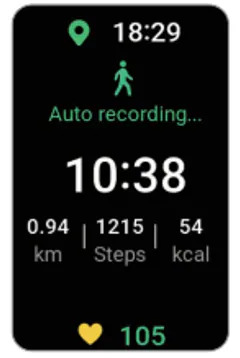
One of the most useful features on the Samsung Fit 3 is auto workout detection. It can recognize walking, running, elliptical use, and dynamic workouts without you having to manually start a session. This means you won’t miss tracking a spontaneous sprint to the bus or an impromptu walk around the block. Head to the Samsung Health app, tap on the Fit 3 settings, and make sure Auto Detect Workouts is toggled on. Let your band do the remembering so you can stay in motion.
Customize Quick Replies for Texts
From Samsung
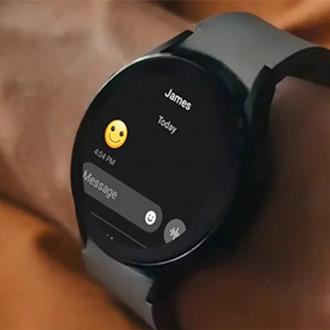
Did you know you can respond to texts right from your wrist? The Fit 3 lets you customize quick replies, so you’re not stuck sending default messages like "OK" or "Talk later." Go to the Galaxy Wearable app, select your Fit 3, and navigate to Notifications > Quick Replies. From there, add your own go-to responses like "On my way!" or "At the gym, ttyl." It’s a tiny tweak that makes a big difference during busy days.
Use Sleep Coaching to Improve Rest
The Fit 3 does more than just track how long you sleep—it coaches you on how to sleep better. After a few nights of wearing it to bed, it begins analyzing your patterns and assigns you a sleep symbol based on your habits. Through the Samsung Health app, you can access personalized sleep coaching tips tailored to your lifestyle. If better rest is on your list, this feature is your nighttime MVP.
Set Up Daily Health Reminders
Whether it's drinking water, standing up, or stretching, the Samsung Fit 3 can nudge you to stay on track with your wellness goals. Through the Samsung Health app, you can enable reminders that align with your routine. It’s especially helpful for remote workers or anyone glued to a desk all day. Consider it a gentle tap that says, "Hey, your body could use a break."
Switch to Manual Brightness for Battery Gains
From Samsung
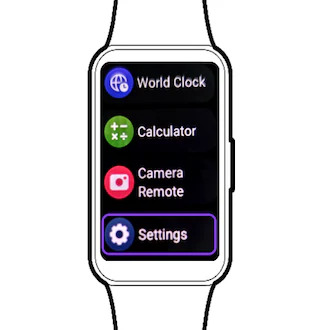
That vibrant AMOLED display? Gorgeous. But it can quietly eat up your battery if you leave the brightness on auto. Dive into the Fit 3's settings and switch to manual brightness to preserve power—especially if you're out and about all day. You’ll still enjoy crisp visuals, just without the unnecessary battery drain. A small adjustment that helps your Fit 3 last even longer between charges.
Ready to Upgrade Your Fitness Routine?
The Samsung Fit 3 is available now at the Next Upgrade Shop—your one-stop destination for the best in smart wellness tech. Grab yours today and take full control of your health journey.
